

Quick answer: which one should you buy?
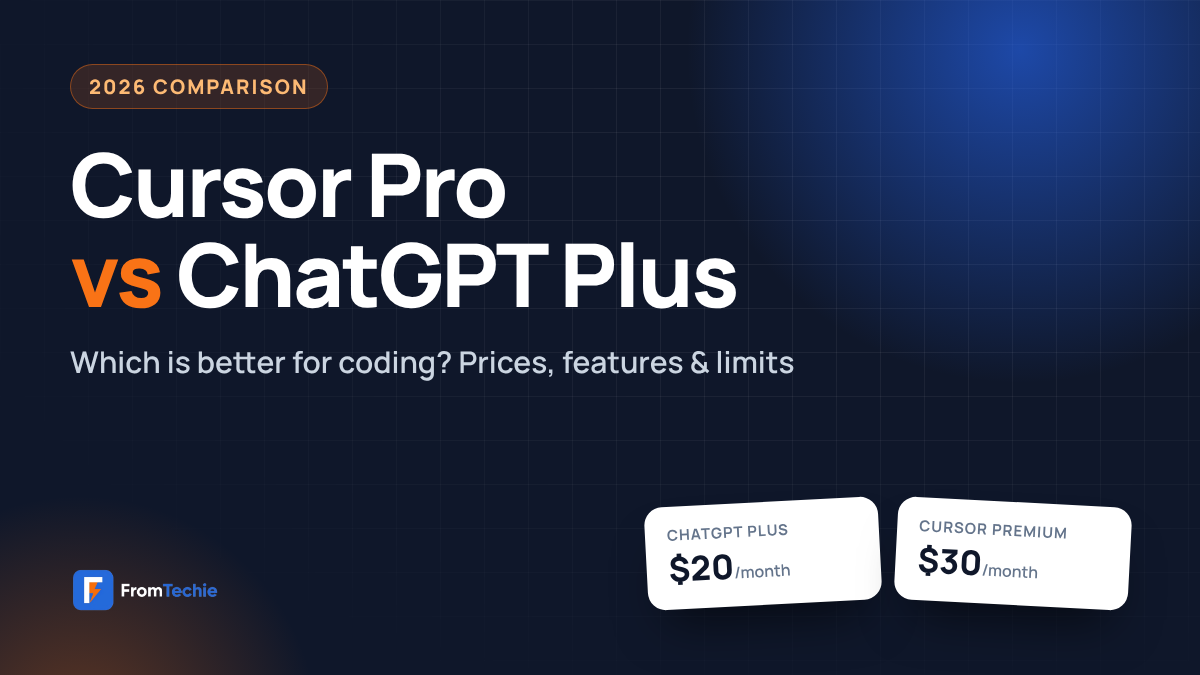
- Cursor Pro is no longer sold to new users. If you search “Cursor Pro vs ChatGPT Plus” today, the real choice is ChatGPT Plus ($20/month) vs Cursor Plus ($8) or Cursor Premium ($30).
- Pick ChatGPT Plus if you want one AI tool for everything: coding help, writing, research, images, voice and the Codex coding agent.
- Pick Cursor Premium if you write code every day and want an AI that lives inside your code editor and understands your whole project.
If you are trying to choose between Cursor Pro vs ChatGPT Plus, you are not alone. Both cost about the same, both help you write code, and both are made for developers who want to work faster. But in late 2026, the question has changed: Cursor stopped selling its Pro plan to new customers and moved to a new set of plans.
In this guide, we explain what happened to Cursor Pro, compare the new Cursor plans with ChatGPT Plus side by side, and help you decide which one is worth your money. We use simple words, clear tables and the official pricing pages, so you can decide in a few minutes.
Prices and plan details in this post were checked on the official Cursor and OpenAI websites on November 13, 2026. Plans change often, so check the links in the Sources section before you buy.
What Happened to Cursor Pro?
Cursor used to sell a $20 Pro plan, and that is why so many people still search for “Cursor Pro vs ChatGPT Plus.” In late 2026, Cursor joined The X Subscription, one subscription for Cursor, Grok and X. New customers now choose from new plans, and the old Pro plan became a legacy plan.
If you already pay for Cursor Pro, nothing breaks. According to Cursor’s own docs, legacy plans “keep working as they are” unless you switch or cancel. But if you are a new user, you can’t buy Pro anymore.
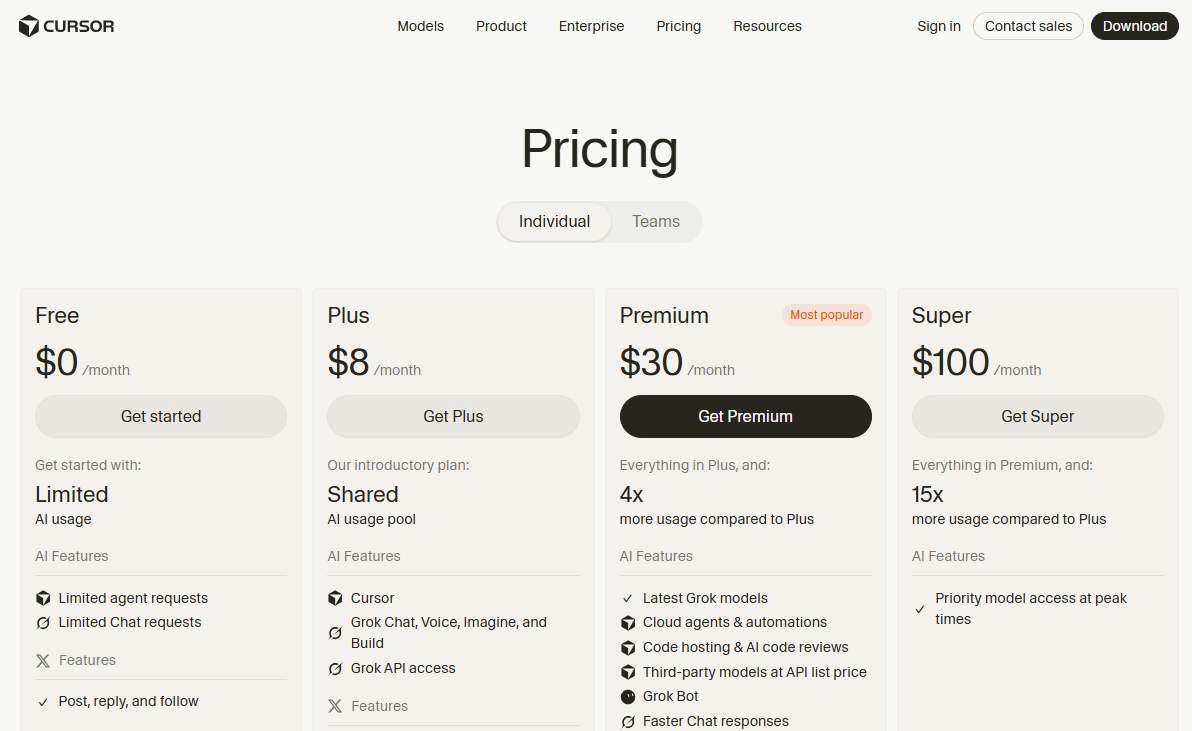
Here is how the old plans match the new ones, based on Cursor’s legacy plans page:
| Old Cursor plan | Old price | Closest new plan | New price |
|---|---|---|---|
| Hobby | Free | Free | $0 |
| Pro | $20/mo | Premium | $30/mo |
| Pro+ | $60/mo | Super | $100/mo |
| Ultra | $200/mo | Ultra | $200/mo |
| Teams Standard | $40/user | Teams (Premium seat) | $30/user |
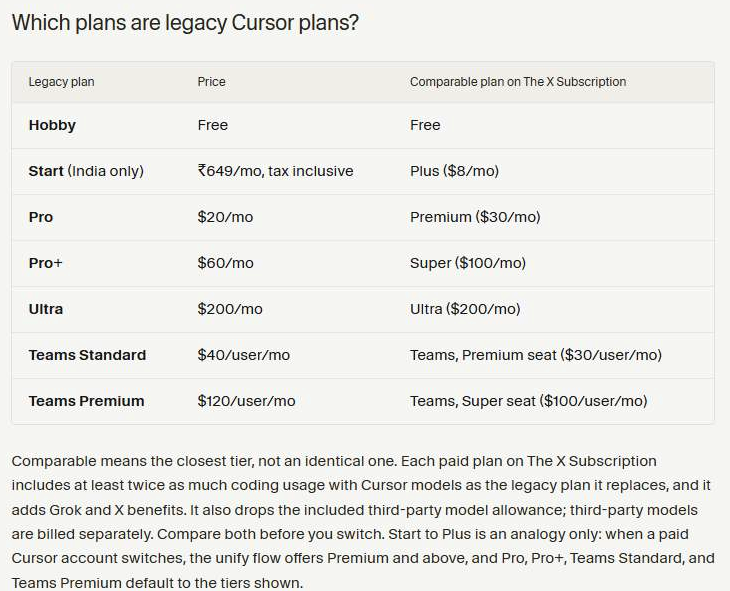
Good to know: The new plans include more usage of Cursor’s own models (Grok and Composer), but third-party models like Claude, GPT and Gemini are no longer included. On Premium and above, you can still use them, but you pay their API price from prepaid credit.
Cursor vs ChatGPT: The Big Difference
Before we compare prices, it helps to understand what each tool actually is. This is the part most people miss when they compare Cursor vs ChatGPT.
- Cursor is a code editor. It is a full IDE built on VS Code, with an AI coding assistant inside it. It can read your whole project (codebase indexing), suggest code as you type (autocomplete), and edit many files at once in Agent mode.
- ChatGPT is a general AI assistant. It is a chat interface you use in the browser, desktop app or mobile app. It helps with code, but also with writing, research, images, voice and much more. For coding, ChatGPT Plus also gives you Codex, OpenAI’s coding agent, which works in your editor, your terminal or the cloud.
So the real question in ChatGPT vs Cursor is simple: do you want an AI that lives inside your code editor, or one smart assistant you use for everything, including code?
Cursor Pro vs ChatGPT Plus: Side-by-Side Comparison
Here is a quick feature comparison of ChatGPT Plus and the two Cursor plans most people consider today.
| Feature | ChatGPT Plus | Cursor Plus | Cursor Premium |
|---|---|---|---|
| Price | $20/month | $8/month | $30/month |
| Annual plan | No (monthly only) | $80/year | $300/year |
| What it is | AI assistant + Codex coding agent | AI code editor (IDE) | AI code editor (IDE) |
| Main AI models | GPT-6 and other OpenAI models | Grok and Composer only | Grok and Composer + Claude, GPT, Gemini at API price |
| Works inside your editor | Yes, with the Codex extension | Yes, it is the editor | Yes, it is the editor |
| Autocomplete while you type (Cursor Tab) | No | Yes | Yes |
| Edits many files at once | Yes (Codex) | Yes (Agent) | Yes (Agent + Cloud Agents) |
| AI code review | Yes (Codex can review code) | No Bugbot | Yes (Bugbot) |
| Writing, research, images, voice | Yes | Grok apps included | Grok apps included |
| Mobile app | Yes (iOS and Android) | Grok apps | Grok apps |
| Usage limits | Limits apply, can change at busy times | Weekly usage pool | 4x the Plus weekly pool |
| Best for | Students, all-round users, mixed work | Beginners on a small budget | Daily coders and professional developers |
Pricing Compared: What You Really Pay
On paper, all three plans look cheap. But the real cost depends on how you work. Here is a simple cost-benefit breakdown.
ChatGPT Plus pricing
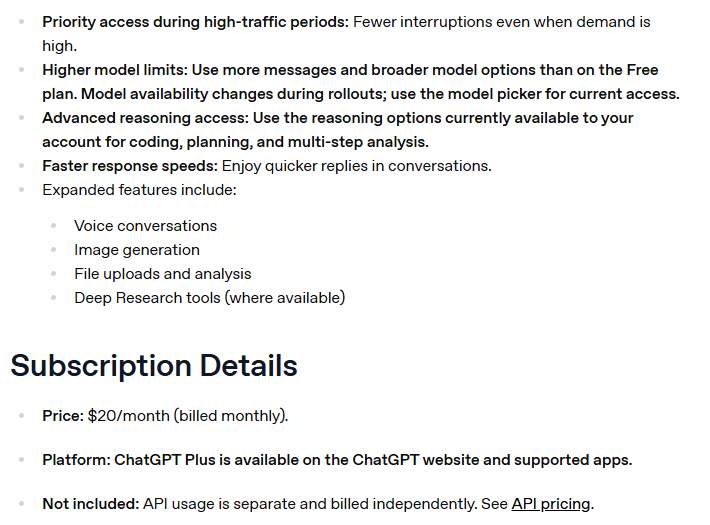
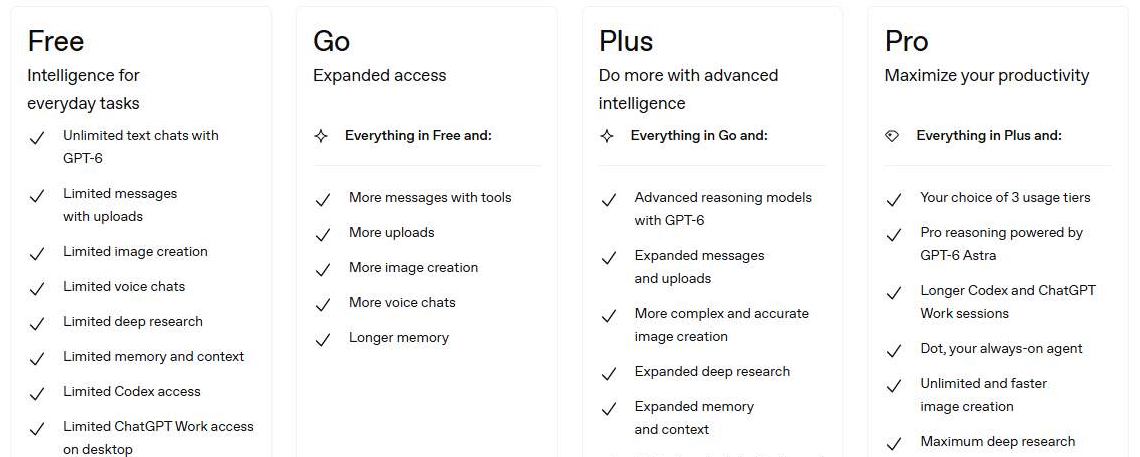
ChatGPT Plus costs $20 per month, billed monthly. OpenAI does not offer an annual plan for Plus. It includes GPT-6 reasoning models, expanded Codex usage, image creation, deep research, memory, projects and custom GPTs. API access is not included; that is billed separately.
Cursor pricing
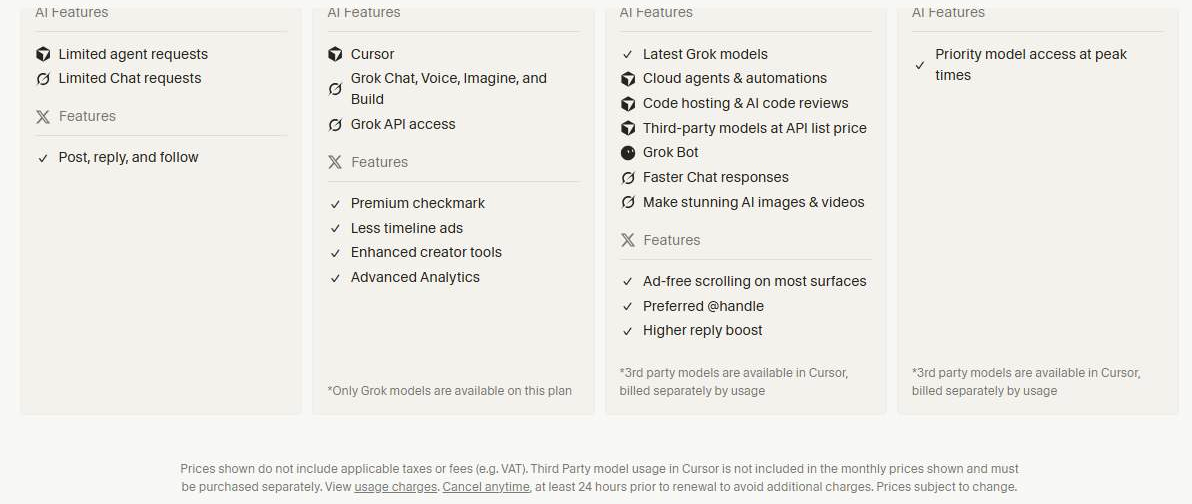
Cursor now has a free tier and four paid plans. Each paid plan gives you a weekly pool of usage that refreshes every week, so one busy day doesn’t use up your whole month.
| Cursor plan | Monthly | Yearly | Usage | Third-party models |
|---|---|---|---|---|
| Free | $0 | – | Limited | Not available |
| Plus | $8 | $80 | Base pool | Not available (Grok only) |
| Premium | $30 | $300 | 4x Plus | Yes, at API price |
| Super | $100 | $1,000 | 15x Plus | Yes, at API price |
| Ultra | $200 | $2,000 | 50x Plus | Yes, at API price |
Real cost for common setups
| Your setup | Monthly cost | Good for |
|---|---|---|
| ChatGPT Plus only | $20 | One tool for coding, writing and research |
| Cursor Plus only | $8 | Trying an AI code editor on a tight budget |
| Cursor Premium only | $30 | Daily coding with the best editor features |
| ChatGPT Plus + Cursor Plus | $28 | A strong all-round setup for less than $30 |
| ChatGPT Plus + Cursor Premium | $50 | Professional developers who want the best of both |
Tip: If you mostly want Claude or GPT models inside Cursor, remember they cost extra on Premium (API price). If you like GPT models, the cheaper path may be ChatGPT Plus with the Codex extension.
Coding Features Compared
Autocomplete and inline suggestions
This is where Cursor shines. As you type, Cursor suggests the next lines of code right in the editor. ChatGPT does not give you live autocomplete; you ask for code in chat or let Codex make the change for you.
Understanding your whole project
Cursor indexes your repository, so it can answer questions about your codebase and make changes across many files. Codex can also work with your repository, and in the editor it uses the files and code you already have open as context.
Agent mode and autonomous coding
Both tools can now do bigger tasks on their own. Cursor’s Agent plans and edits code across files, and Premium adds Cloud Agents and Automations. ChatGPT Plus includes Codex, which can work in your editor, in the terminal (Codex CLI) or in the cloud, where it runs coding tasks in parallel.
Debugging, refactoring and tests
Both can explain errors, suggest fixes, refactor messy code and write tests and documentation. Cursor feels faster for small fixes because it changes the code where it is. ChatGPT is great when you want a clear explanation in plain English before you change anything.
Code review and Git
Cursor Premium includes Bugbot, which reviews your code changes. Codex can also review code. Both work with Git and version control, but always review AI changes before you merge a pull request.
Good to know: Every AI coding assistant can make mistakes (sometimes called “hallucinations”). Read and test the code before you ship it, especially for security or payments.
The ChatGPT Cursor Extension: Can You Use Both?
Yes, and this surprises many people. OpenAI’s Codex IDE extension works in VS Code, Cursor and Windsurf. So the “ChatGPT Cursor extension” is real: you can install Codex inside Cursor and sign in with your ChatGPT account.
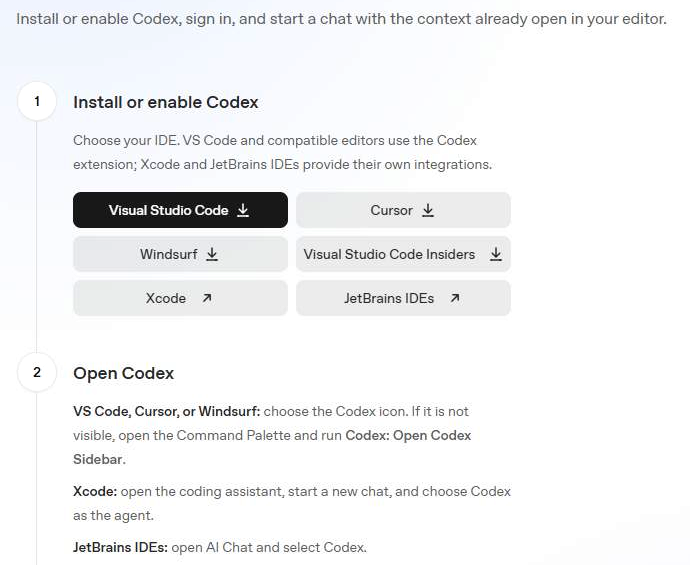
This means you could use Cursor as your editor and still use your ChatGPT Plus Codex usage inside it. For many developers, Cursor Plus ($8) + ChatGPT Plus ($20) is a smart, budget-friendly combo.
- Open Cursor and install the Codex extension from the extensions panel.
- Click the Codex icon, or open the Command Palette and run Codex: Open Codex Sidebar.
- Sign in with your ChatGPT account and start a chat with your open files as context.
Models, Context Window and Speed
When people search “Cursor vs GPT,” they usually want to know which AI model writes better code. The AI model behind a tool decides how smart and how fast it feels, so model selection matters.
- ChatGPT Plus gives you OpenAI’s GPT-6 models in the model picker. On Plus, the reasoning models have a total context window of about 256K tokens (roughly 320 pages of text).
- Cursor Plus runs on Cursor’s own models: Grok 4.7, Grok 4.6, Grok 4.5 and Composer 2.5. Grok 4.7 uses a 256K context window on Plus.
- Cursor also supports plugins and MCP servers to connect other tools. Cursor Premium and above also let you pick third-party large language models such as Anthropic’s Claude, OpenAI’s GPT and Google’s Gemini, paid at API list price.
Many older comparisons still talk about GPT-4 and a $20 Cursor Pro. Both are out of date in 2026, so be careful with older articles.
Usage Limits: How Much Can You Use?
| ChatGPT Plus | Cursor (new plans) | |
|---|---|---|
| How limits work | Message and tool limits that can change at busy times | One weekly usage pool for Cursor models |
| When it resets | Rolling limits | Every week |
| If you run out | Wait, or upgrade to Pro | Wait for the reset, top up credit, or upgrade |
| Fixed request counts published? | No | No |
Neither company publishes fixed rate limits or a fixed number of requests. In simple terms: Cursor gives you a weekly “bucket” to use, and ChatGPT Plus gives you generous limits that may tighten when lots of people are online.
Everyday Experience: Learning Curve, Languages and Support
Onboarding and learning curve
ChatGPT has almost no learning curve. You type a question in natural language, like you would ask a friend, and it answers. It feels like a friendly chatbot and a pair programming partner at the same time. Cursor takes a little longer to learn, because it is a full code editor. The good news: it looks and feels like VS Code, so if you already use VS Code, onboarding takes minutes. If you use JetBrains IDEs, note that Cursor is a separate editor, while Codex has its own JetBrains integration.
Language support
Both tools work well with popular programming languages like Python, JavaScript and TypeScript, and most other common languages. They understand syntax, explain errors and help with code generation, code completion and test generation. Code quality and accuracy depend more on the model you use and how clear your prompt is than on the language.
Multimodal features beyond code
ChatGPT Plus is a full conversational AI. Besides code, it supports image understanding, file uploads, web browsing (search), voice mode, memory, custom instructions, projects and plugins. Cursor focuses on coding, but its plans also include Grok apps for chat, voice and images.
Speed, reliability and support
ChatGPT Plus gets fast response times and priority access during busy hours. On Cursor, higher plans like Super get priority model access at peak times, which helps with latency. Both companies publish status pages so you can check uptime, and both offer help centers, customer service, documentation and an active user community. Neither tool works offline: the AI runs in the cloud, so you need an internet connection, even though Cursor itself is a desktop app on your local machine.
Privacy and Code Security
- Cursor: turn on Privacy Mode (Settings → General) and your code is never used for training by Cursor or the AI model providers. For teams, Privacy Mode is on by default, and Teams plans add custom chat data retention settings.
- ChatGPT: OpenAI may use conversations to improve its models, but you can opt out in Data Controls at any time. Data is encrypted in transit and at rest.
Tip: If you work on private client code, turn on Privacy Mode in Cursor and opt out of training in ChatGPT before you paste any code.
Who Should Choose What?
The best value depends on your target audience: who you are and how much you code. Software engineers, programmers, students and hobbyists all need different things.
| If you are… | Best choice | Why |
|---|---|---|
| A student or beginner | ChatGPT Plus | Explains code in plain English and helps with every subject |
| A hobbyist on a budget | Cursor Plus ($8) | The cheapest way to get an AI code editor |
| A professional developer | Cursor Premium | Autocomplete, Agent, Cloud Agents and Bugbot in one editor |
| A freelancer doing mixed work | ChatGPT Plus + Cursor Plus | Coding, writing and client work for $28 |
| A team or company | Cursor Teams/Enterprise or ChatGPT Business/Enterprise | Seat-based pricing, central billing, admin controls and privacy settings |
Pros and Cons
ChatGPT Plus
- ✅ One tool for code, writing, research, images and voice
- ✅ Codex works in your editor, terminal and the cloud
- ✅ Mobile and desktop apps
- ❌ No live autocomplete while you type
- ❌ No annual plan
Cursor (Plus and Premium)
- ✅ AI built into a full code editor
- ✅ Fast autocomplete and multi-file Agent edits
- ✅ Cheap $8 starter plan and yearly discounts
- ❌ Plus only works with Grok and Composer models
- ❌ Claude and GPT cost extra, even on Premium
Cancellation, Refunds and Free Plans
- Free plans: both tools have a free tier, so you can try them before you pay. Neither needs a separate trial period.
- ChatGPT Plus: cancel anytime from Settings → Account. If you think you were charged by mistake, you can request a refund from OpenAI.
- Cursor: you can cancel anytime, at least 24 hours before your renewal date, to avoid the next charge. Billing for the new plans is managed at grok.com/dashboard/billing.
Final Verdict: Cursor Pro vs ChatGPT Plus
For most people searching Cursor Pro vs ChatGPT Plus in 2026, here is the simple answer:
- Choose ChatGPT Plus if you want the best all-round AI for $20, with Codex for coding.
- Choose Cursor Premium if coding is your main job and you want the smoothest AI code editor for developer productivity.
- Choose Cursor Plus + ChatGPT Plus if you want both for $28 a month, using the Codex extension inside Cursor.
Still not sure? Start with both free plans for a week and see which one fits your workflow. Have a question about your setup? Ask us in the comments.
FAQs
Is Cursor Pro still available?
Not for new customers. Cursor now sells Free, Plus ($8), Premium ($30), Super ($100) and Ultra ($200). Existing Cursor Pro subscribers can keep their plan at $20/month unless they switch or cancel.
Is Cursor better than ChatGPT for coding?
For daily coding inside an editor, Cursor is usually smoother because of autocomplete and Agent mode. ChatGPT Plus is better if you also want help with writing, research and learning, and its Codex agent is strong for bigger coding tasks.
Can I use ChatGPT inside Cursor?
Yes. OpenAI’s Codex IDE extension works in Cursor. Install it, sign in with your ChatGPT account, and it uses your ChatGPT plan’s Codex usage.
Which is cheaper, Cursor or ChatGPT?
Cursor Plus is cheaper at $8/month, but it only includes Grok and Composer models. ChatGPT Plus is $20/month. Cursor Premium, the closest plan to the old Cursor Pro, is $30/month.
Does Cursor Plus include Claude or GPT models?
No. Cursor Plus only includes Cursor’s own models (Grok and Composer). Third-party models like Claude, GPT and Gemini are available on Premium and above at API list price.
Is my code safe with Cursor and ChatGPT?
Both offer privacy controls. In Cursor, turn on Privacy Mode so your code is not used for training. In ChatGPT, opt out of model training in Data Controls.
Sources
- Cursor Pricing (Cursor, checked Nov 13, 2026)
- Models & Pricing (Cursor Docs)
- Legacy Cursor plans (Cursor Docs)
- Privacy and data (Cursor Docs)
- ChatGPT Plans and Pricing (OpenAI, checked Nov 13, 2026)
- What is ChatGPT Plus? (OpenAI Help Center)
- Codex IDE extension (OpenAI)
Update history
November 13, 2026: First published. Prices and plans checked on the official Cursor and OpenAI websites.

Written & tested by
Leave a Reply